

Delete your Lobby Game user data
Lobby Game collects information about users for the proper functioning of the application.
- The application requests the user's email address and a password to register and save their progress.
- The application can request the user's year of birth or gender (100% optional) to facilitate account management.
- This personal data is not displayed to other users of the application.
- This data is not shared with anyone by the developers.
- The redirects made by the application are not tracked.
- The redirects made by the app are safe.
- Users can also delete their personal data, derecognize the application, using the link that can be found in the options of the user profile of the application named "delete account", or go to the Comy website to request manual removal by the developers.
Delete data
To delete your user data via the app, simply follow the 3 steps below. When you delete your data via the app, your Lobby Game account is deleted at the same time.
All your user and personal data will be deleted :
- Profile picture
- Nickname
- Password
- Description
- Games score
- Phone number (not accessible by us : used for ads)
1. Go to your profile at the bottom left
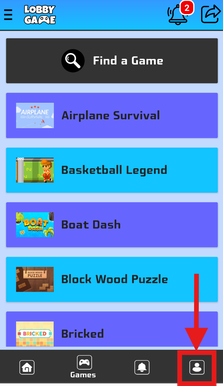
2. Swipe down the screen

3. Click on "Delete account"
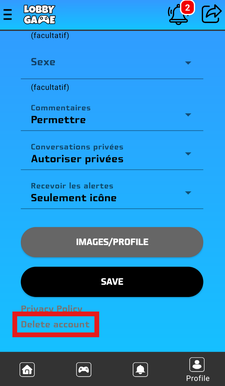
Your account will be deleted, along with all your personal user data, the second you confirm the action.
Request with a form
Below is a form that allows you to request the deletion of all your user data from the Lobby Game app. Data deletion can take up to 48 hours. When you request deletion of your data, your Lobby Game account is deleted along with all your personal user data.